
Secure Credential Transfer for Secret Server
Overview
The Secret Server Clipboard Utility is a browser extension designed to streamline secure credential handling within the Thycotic Secret Server ecosystem. Its primary function is to enable seamless data transfer between Secret Server, the system clipboard, and web browsers. This utility allows users to copy credentials and other field types directly from Secret Server and paste them into login forms without manual entry, reducing the risk of errors and exposure.
It is specifically tailored for environments where secure access to sensitive information is critical, such as enterprise IT operations, DevOps workflows, and system administration tasks. The extension supports the transfer of login credentials, API keys, and other confidential data, ensuring that sensitive values are handled with minimal risk during transit. It is primarily configured for use with Secret Server version 10.7.000002 and earlier, making it a targeted solution for organizations still operating on older versions of the platform.
For users on newer versions of Secret Server (10.7.00059 and later), the developer recommends switching to the Secret Server Web Password Filler extension, which offers enhanced functionality and improved security protocols. The utility operates entirely within the browser environment, requiring no installation beyond standard extension setup. This makes it ideal for teams that prioritize both efficiency and security in credential management.
Key Features & Capabilities
- Secure Credential Copying – Enables users to copy credentials directly from Thycotic Secret Server fields and store them temporarily in the system clipboard.
- Seamless Browser Integration – Allows pasted credentials to be used directly on web login pages, eliminating manual data entry and reducing human error.
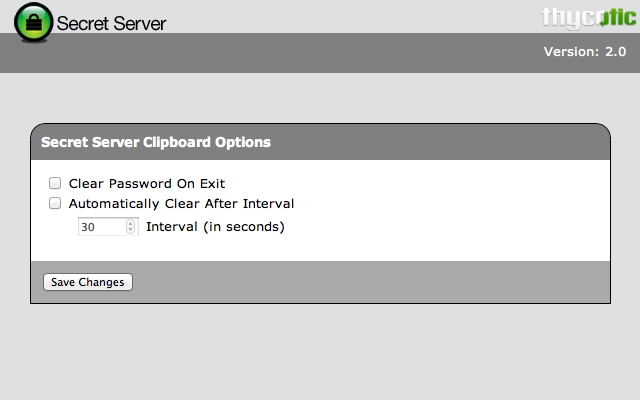
- Automated Clipboard Clearing – Offers configurable options to clear the clipboard at set intervals or when the browser tab is closed, minimizing exposure risk.
- Compatibility with Older Secret Server Versions – Optimized for use with Secret Server version 10.7.000002 and earlier, ensuring continued support for legacy systems.
- Minimal User Intervention – Designed for quick access and straightforward operation, reducing workflow disruption during high-pressure tasks.
These capabilities are particularly useful in environments where rapid access to secure credentials is required, such as incident response scenarios or routine server maintenance. The ability to copy and paste credentials securely helps maintain operational speed while adhering to security best practices. The automated clearing feature adds an extra layer of protection by preventing sensitive data from lingering in the clipboard after use.
User Interface, Workflow & Performance
The Secret Server Clipboard Utility operates as a browser extension, integrating directly into the browser’s interface. Its user interface is minimal, focusing on functionality over visual design. Users interact with the extension through a small icon in the browser toolbar, which activates when accessing Secret Server.
Navigating through the extension’s features is straightforward. Once activated, users can select the desired credential field, copy it to the clipboard, and paste it into the target web form. The workflow is designed to be intuitive, requiring no additional configuration for basic use. Advanced options, such as clipboard clearing intervals, are accessible through a simple settings panel.
Performance details were not specified by the developer. However, as a lightweight browser extension with a file size of 4.7 MB, it is expected to have minimal impact on system resources. The extension runs in the background and does not require constant CPU or memory allocation. Stability is maintained through standard browser sandboxing, which isolates the extension from core system processes. The developer did not provide additional system requirements or performance benchmarks.
Compatibility & System Requirements
The Secret Server Clipboard Utility is compatible with Windows, Mac, and Linux operating systems, ensuring broad accessibility across enterprise environments. It functions as a browser extension, meaning its performance and availability depend on the supported web browsers installed on the system.
The software version is 1.1.2, with a file size of 4.7 MB, indicating a lightweight deployment. The developer did not specify exact system requirements, including minimum RAM, CPU, or disk space. Compatibility information is limited to the supported platforms and Secret Server versions.
For users on Secret Server version 10.7.00059 and later, the extension is not recommended. Instead, the Secret Server Web Password Filler extension is advised for improved functionality and security. This dependency on specific Secret Server versions highlights the importance of version alignment when deploying the utility in production environments.
Pros and Cons
Pros
- Streamlines secure credential transfer between Secret Server and web browsers
- Reduces manual entry errors and improves workflow efficiency
- Includes automated clipboard clearing to enhance data security
- Lightweight with a small file size of 4.7 MB
- Free to use, with no licensing costs
Cons
- Only supports Secret Server versions up to 10.7.000002
- Not compatible with newer Secret Server versions (10.7.00059 and later)
- Minimal UI design; lacks advanced customization options
- Performance and resource usage details were not provided
- Dependent on browser environment and extension support
FAQ Section
Is the Secret Server Clipboard Utility compatible with Secret Server 10.7.00059 and later?
No. The extension is not recommended for use with Secret Server version 10.7.00059 and later. Users on newer versions should use the Secret Server Web Password Filler extension instead.
Can I use this extension on Windows, Mac, and Linux?
Yes. The utility is compatible with Windows, Mac, and Linux operating systems, as long as the supported browser is installed.
Is the software safe to use?
Yes. The extension operates within the browser’s security sandbox and is developed by Thycotic, a trusted provider in the security software space. It is designed to minimize data exposure during credential transfer.
How often can I set the clipboard to clear automatically?
The extension allows users to configure automatic clipboard clearing at intervals or when the browser tab closes. Specific timing options are available in the settings panel.
Do I need to update the extension regularly?
Updates are recommended to maintain compatibility and security. Users should check for updates through their browser’s extension manager or the official Thycotic web store.
Final Thoughts
The Secret Server Clipboard Utility delivers a focused, secure solution for transferring credentials from Thycotic Secret Server to web login forms. Its lightweight design, automated clearing feature, and seamless integration make it a valuable tool for IT professionals managing access to sensitive systems. While its compatibility is limited to older Secret Server versions, it remains a reliable option for organizations still using those releases.
For users on newer Secret Server versions, the recommended alternative is the Web Password Filler extension. However, for legacy environments, this utility offers a practical and secure workflow enhancement. The fact that it is free and requires no additional system resources makes it an attractive choice for teams prioritizing both efficiency and data protection.
Download Secret Server Clipboard Utility now







